Take enquiries from your website
Put a form on your own website that turns each enquiry into a new job, with the customer and their photos.
The website enquiry form is a form you put on your own website, or share as a link. Each enquiry arrives in Crewzy as a new job, marked Website enquiry, ready for you to quote or book.
Turn it on
Go to Settings, Website enquiry form, and tick Take enquiries from a form on my website. The form gets its own address straight away.
Put it on your website
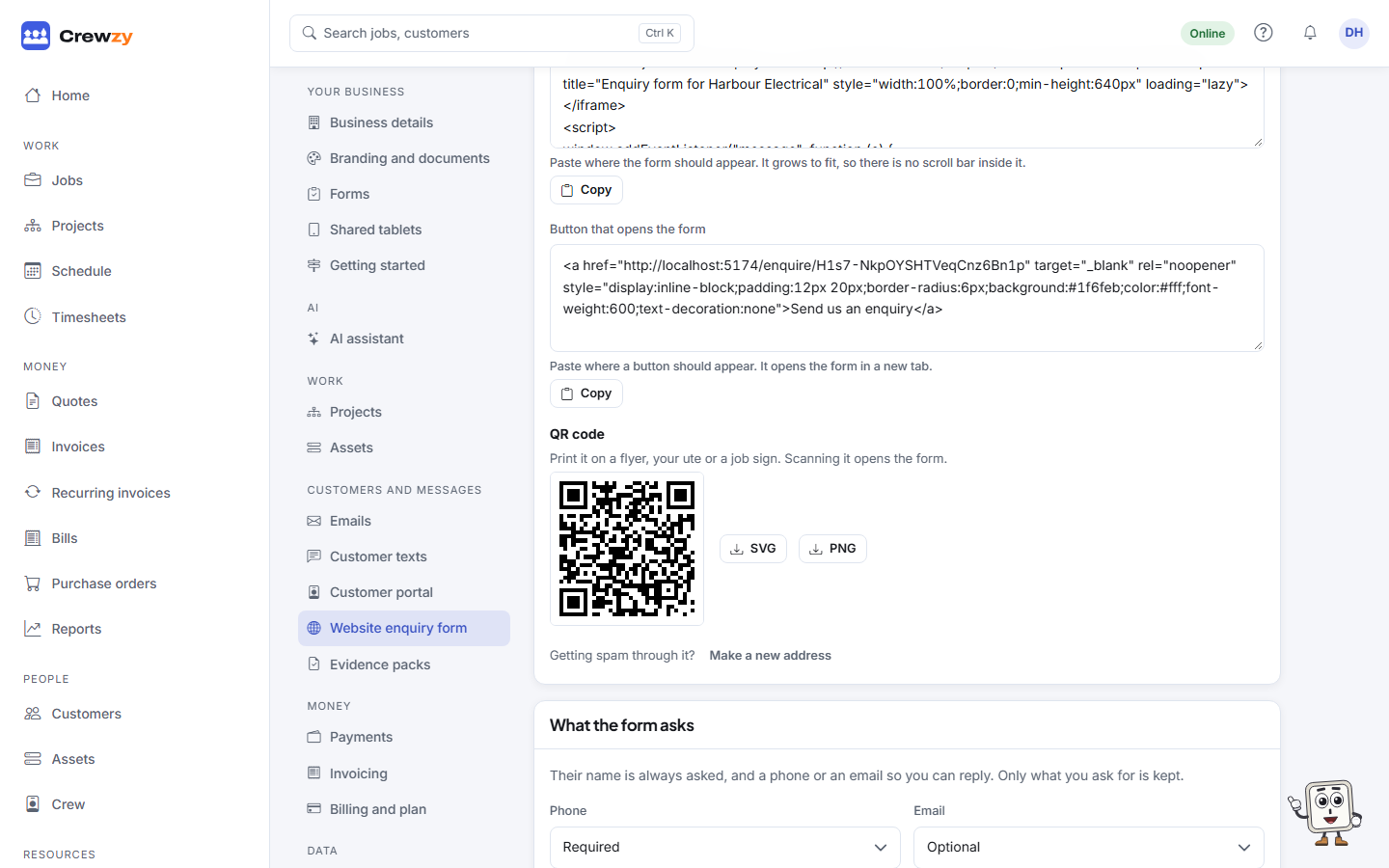
Once it is on, the page gives you three things to copy:
- Link to the form: share it anywhere, such as your Google Business Profile, Facebook page or email signature.
- Form inside your website: paste it into a page of your website where the form should appear. It grows to fit, so there is no scroll bar inside it. It works with website builders that let you add custom HTML.
- Button that opens the form: a button that opens the form in a new tab.
Under them is a QR code of the form's link. Download it as SVG or PNG and print it on a flyer, your ute or a job sign: scanning it with a phone camera opens the form.
Open the form shows it as your customers will see it. The Preview at the bottom of the settings page shows your changes as you make them.
Choose what it asks
The form always asks for a name, and a phone number or an email so you can reply. For each of phone, email, address, what the job is, details, best days and times, photos and how they heard about you, choose Required, Optional or Not asked. Only what you ask for is kept.
To have them choose a job type, list your job types one per line under Job types to choose from and set What the job is to Required or Optional.
People can send up to five photos. They are made smaller on their phone before they are sent, and saved on the job.
What happens to an enquiry
- The customer: if one of your customers has the same email or phone, the job goes on them. If the details fit more than one customer, Crewzy never guesses: it makes a new customer, and the job page names the customers it might be, so you can check before you quote.
- The job is new, with their words as the description and their best days and times included.
- AI, if you leave it on, gives the job a short title and a priority. Their own words are never changed. It counts towards your AI allowance and does nothing while AI is off.
- You are told: a "Website enquiry" notification, set per person under your notification settings, and an email to the address under Also email each enquiry to, if you set one. Waiting enquiries also show in Customer questions on Home.
- They are thanked: on the form with your Thank you message, by email if you tick Email them a thank you, and by text if Enquiry received is on under Settings, Customer texts. Change the email's wording under Settings, Emails.
On the Jobs board or list, choose Came from, Website enquiry to see only these jobs.
Ask the assistant
Ask "any new enquiries today?" or "enquiries this week", or "turn the enquiry from Robin into a quote". The assistant shows what it will do and waits for you to confirm before it drafts the quote.
Spam
The form stops most spam without anything for your customers to do: it has a hidden field that only bots fill in, ignores forms sent within seconds of opening, ignores the same enquiry sent twice in a day, and limits how many enquiries can come from one place and to your business in an hour. It sets no tracking cookies.
If spam still gets through, add A question to stop spam with its answer, such as "What colour is the sky?". If your form address has been picked up by spammers, Make a new address: the old link and every pasted copy stop working, so paste the new snippet into your website.
Privacy
The form says that you use what is sent only to reply to the enquiry, and that Crewzy runs the form for you. Add a link to your own privacy policy under Your privacy policy and it shows under the form.