Claim reports, Home and the bell
The claim history and retention ledger reports with CSV, and how Home and the bell tell you when a claim, a schedule, a payment or retention is due.
Claims and retention are easy to lose track of across several projects. Two reports and three Home widgets bring them together, and the bell tells you when something falls due.
Claim history report
Go to Money, Reports and choose Claim history, or press Report on the Claim history box of a project's Claims tab. It lists every claim that has gone: when it was submitted, its invoice, where it is up to, the amount claimed, the amount scheduled, what has been paid and what is still owing, how many days it took to be paid, and the reasons given for paying less, with disputed schedules marked.
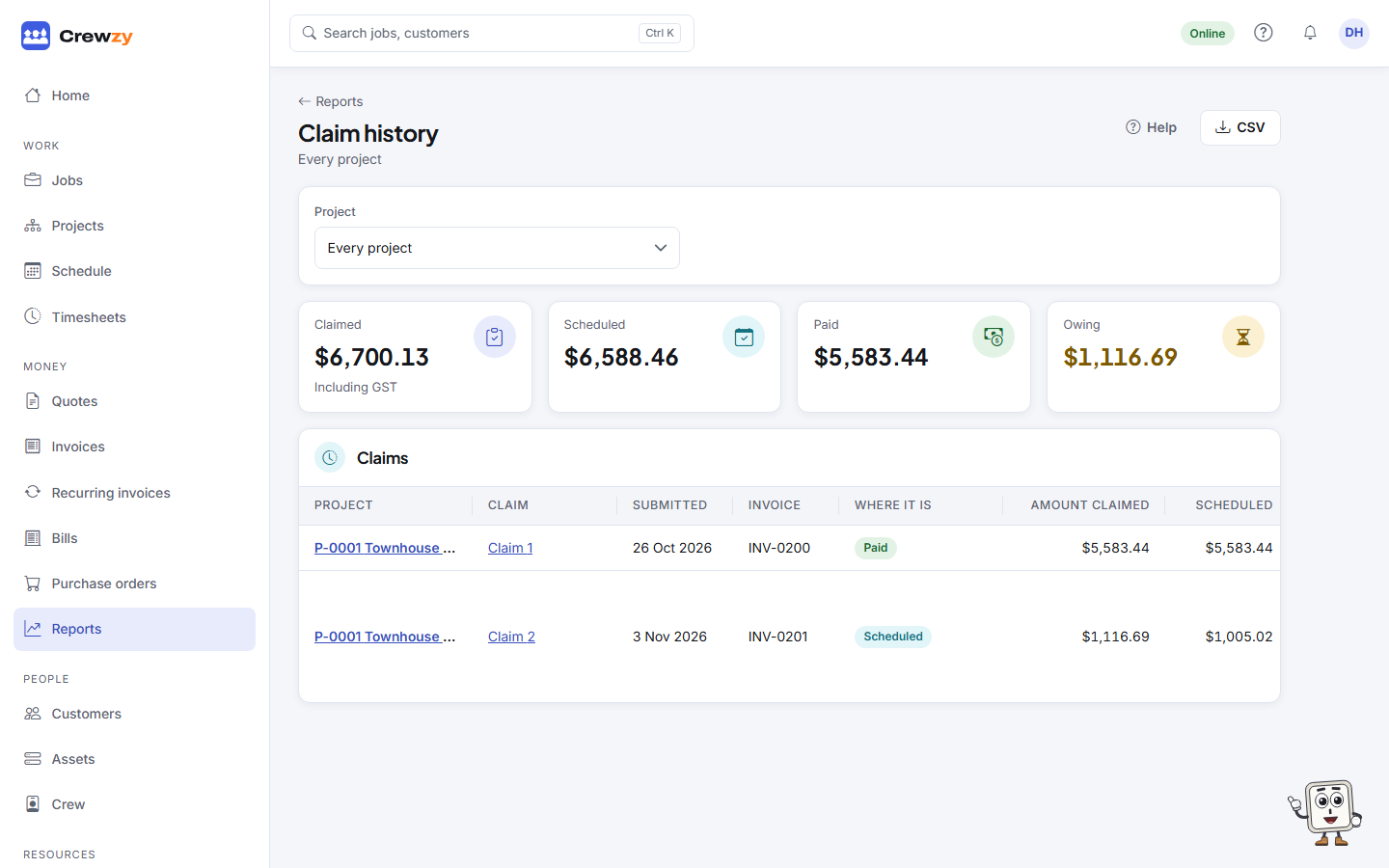
Choose a Project to see only its claims, or Every project for the whole business. The figures across the top, Claimed, Scheduled, Paid and Owing, add up the claims shown. CSV downloads the same rows.
Retention ledger report
Choose Retention ledger under Money, Reports, or press Report on the Retention ledger box of a project's Retention tab. For the whole business it lists every project that has held retention: held, released, kept and still held, what can be claimed back at practical completion and at the end of the defects period and when, and anything overdue on a release claim. For one project it adds the ledger, a row for each movement with what was still held after it.
CSV downloads the projects, or for one project its ledger.
On Home
Three widgets keep claims in view. They appear once the business has made a claim; add or move them with Arrange.
- Claims due: projects whose claim day is today or within a week, and whether the claim is started. When a claim day passed with no claim, the project stays listed with its next claim day and a note naming the months missed, such as "No claim made for August and September".
- Retention to claim: retention that can be claimed back now, or within the next 30 days, and how much can be claimed today.
- Schedules waiting: claims whose payment schedule was due and is not recorded.
In the bell
You are told once about each of these:
- a project's claim day, on the day (or within the week after, if it could not be told then), naming any months missed before it,
- a payment schedule not recorded by the day it was due,
- a claim's payment overdue, or under an RCTI, payment due with no RCTI recorded,
- retention that can be claimed back: 30 days before, and again on the day.
Choose how you hear about each under Notifications in your profile menu: in the app, by email or on your phone. The owner and the office are told by default. See Your notifications.
These dates are guides. This is product guidance, not legal advice: check your contract.