The final claim and closing a project
Make the final claim, see when it is due, and close the project once its claims are paid and its retention is back.
At the end of the work you make a final claim for everything still owed, claim back the retention, and once you have been paid, close the project.
Make the final claim
Start a claim as usual on the Claims tab, and tick Final claim at the top of the draft. A final claim is a progress claim in every other way: its lines are measured from the claim before, it holds retention, and it is your tax invoice.
A final claim usually claims everything still owed under the contract, including approved variations. The draft tells you how many lines are not claimed in full; Claim the rest in full sets each of them to 100%. Anything the final claim leaves out may not be claimable later.
It is headed Final Claim on the PDF and in your invoices, and the email says it is your final claim. Untick Final claim while it is still a draft if you made it final by mistake.
If your last claim went out without being marked final
A claim cannot be marked final once it has gone: its PDF would no longer be what you sent. If your last claim already claimed everything, press Final claim for nil on the Claims tab (or beside "No final claim has been made" in the Closing the project box). It starts a draft final claim with every line at what your last claim said, so it claims nothing more, and opens it for you to check. Submit or email it as usual: it is a tax invoice (or, under an RCTI, a payment claim) for $0.00, and it holds no retention.
A claim for nil is not sent to Xero: it has no amount or GST to record. It counts as paid, waits for no payment schedule, and under an RCTI needs no RCTI from the builder.
Once the final claim has gone, no more progress claims can be started on the project. Retention still held is claimed back from the Retention tab as before.
When it is due
Some states' Acts set a time for the last claim. In Victoria, from 15 April 2026, no payment claim can be made more than six months after practical completion. For a Victorian project, the Claims tab shows the last day once practical completion is recorded, and warns you from a month before. Other states set no time in the Act, but your contract may.
This is product guidance, not legal advice: check your contract.
Close the project
Open the project's Overview tab. The Closing the project box lists what is left before the project can be closed:
- a claim still a draft,
- no final claim made yet (with Final claim for nil beside it when your last claim went out as a progress claim),
- a claim, or a release of retention, not yet paid in full, or still waiting for the builder's RCTI,
- retention still held: claim it back, or record what the builder kept.
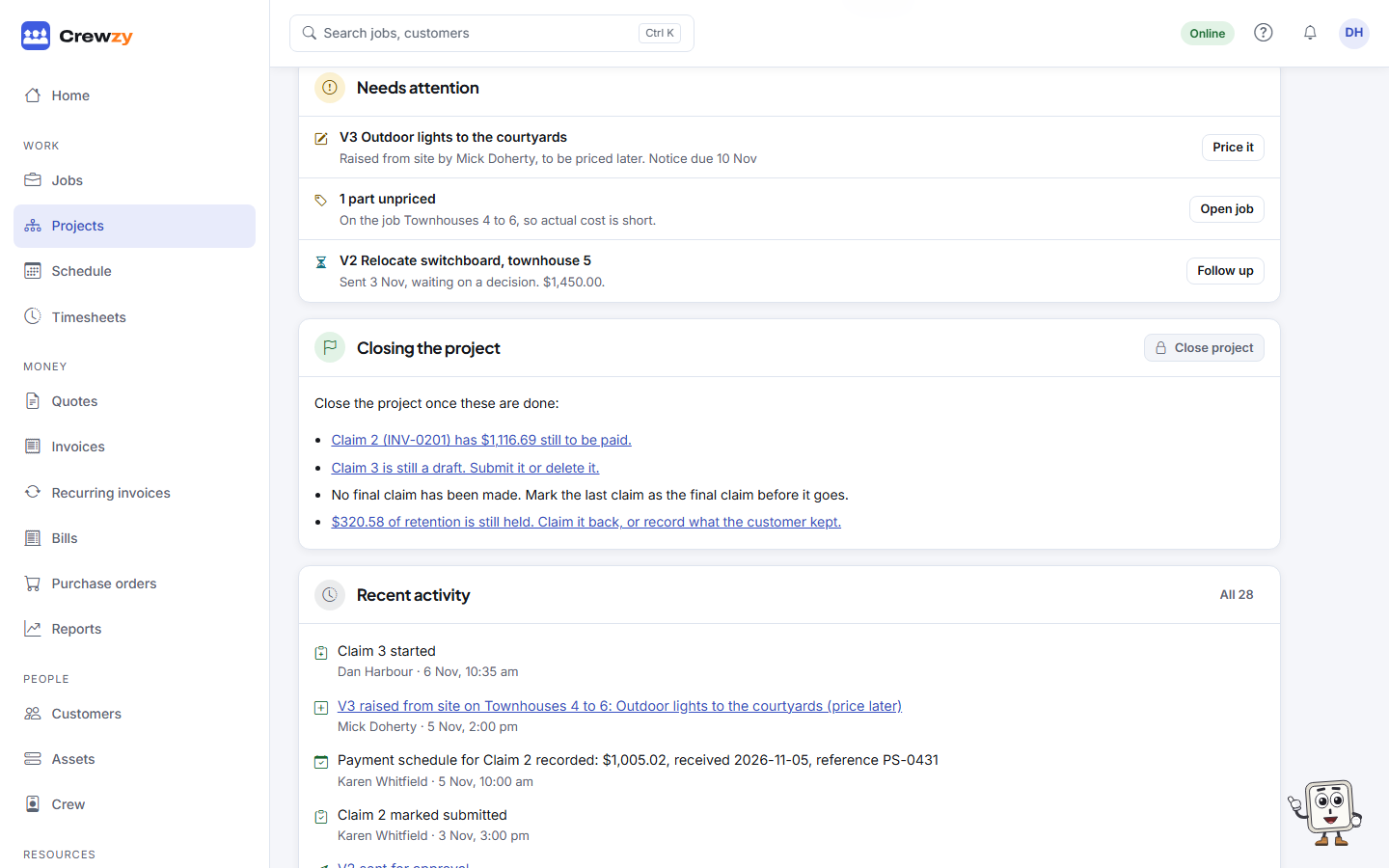
Each links to where it is done. When nothing is left, press Close project, then Close project again to confirm. A project that made no progress claims can be closed at any time. Choosing Closed as the Status with Edit on the Details box does the same checks.
A closed project is kept for the record and can no longer be changed. A note at the top of every tab says it is closed, and Make quote and Make jobs are greyed out. Its stages, claims, retention and details are read only, and it no longer counts towards your plan's active projects. Its jobs stay as they were.
Reopen it
To change a closed project, press Reopen on the Closing the project box, or set another Status with Edit on the Details box. It goes back to the status it had before it was closed, and counts towards your plan's active projects again.