Speak your job sheet
Say what you did and the parts you used, and it is written up for you to check.
Hands dirty, phone in your pocket? Say what you did instead of typing it. Crewzy writes it up as a draft job sheet, and nothing goes on the job until you have checked it.
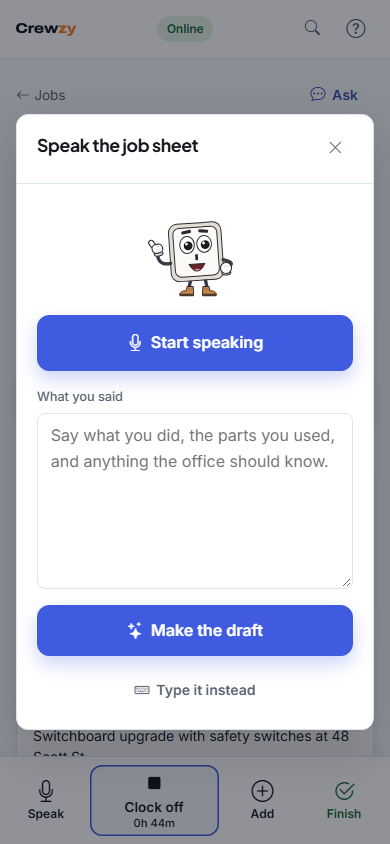
Speak it
- Open the job and tap Speak in the bar along the bottom. It takes the place of On my way once you clock on, or is there from the start when your business does not send that text. On a bigger screen it is the Speak the job sheet button above the job. Once the job is finished it is no longer offered.
- Tap Start speaking and say what you did, the parts you used and anything the office should know. For example: "Replaced the RCD and tested every circuit. Used two 20 amp breakers. Need to come back Tuesday to fit the cover plate."
- Tap Stop. The words are there to fix if the phone misheard anything.
- Tap Make the draft.
Keep it under three minutes. If your phone cannot listen as you talk, you get Start recording instead, which works the same way.
Check the draft
The draft shows:
- Work done, tidied up so the customer can read it. Change anything you like.
- Parts and materials, matched to your business's price list. Change a quantity, or take a part out. A part marked Not on price list is added as you said it, and the office prices it.
- The time, if you said when you started or how long it took: "You said ...". This goes to the office as a note. It never changes your timesheet, which still comes from clocking on and off.
- For the office to follow up, such as a return visit or a part to order.
Tap Add to job when it is right. Later keeps the draft on the job to finish another time, and Throw away gets rid of it.
With no signal
Record it as usual and tap Save for when there's signal. The recording waits on your phone and is written up once you are back in range. You are told when the draft is ready to check. If your business's set-up cannot turn recordings into words, you are told that instead, and can type the job sheet.
For the office
The office can do the same from notes: on the job, open the assistant in the corner, choose Draft a job sheet from notes, and paste in a text or what the crew said on the phone. The draft opens on the job to check before it is added.