Ask the assistant on a job
Ask about the job you are on or your day, and have it draft a note, a part, a variation or a time fix for the office for you to check.
The assistant on your phone knows the job you opened it from. Ask it where to get in, what is left to do or what you are booked on today, and it answers from your own jobs. It can also write up a note, a part you used or a variation for you to check before anything changes.
Open it
- Open the job.
- Tap Ask at the top of the screen, on the same line as Jobs.
- Tap one of the suggestions, type your question, or tap the microphone and say it. Fix anything the phone misheard, then tap Ask.
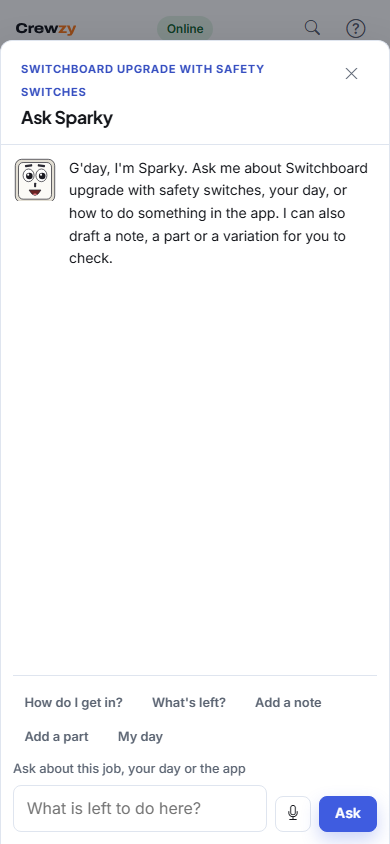
The newest answer is at the top. Tap a job's name in an answer to open it.
What you can ask
- About this job: the address and how to get in (until the job is finished), what the job is, who else is on it, the parts used so far, the forms to fill in, variations raised on it and what is still left to do.
- About your day: what you are booked on today, tomorrow, this week or next week.
- About the app: how to clock on, speak a job sheet, work without signal and the rest of the crew app.
It only sees the jobs you are on. It cannot see other people's jobs, prices, costs, invoices, quotes or the customer's phone and email. Ask the office about those. It also won't answer general questions or tell you how to do the work itself, such as what cable size to use: check the standards or ask your supervisor.
Have it write something up
Say or type what you want, for example:
- "Add a note: meter box needs a new lock"
- "I used 6 m of 25mm conduit"
- "Variation: the builder wants two extra downlights in the hall"
- "Fix my time: I forgot to clock off yesterday, I finished at 3"
The assistant shows a card with exactly what would be added. Nothing changes until you tap Confirm, and Cancel throws it away.
- A note goes in the job's Notes box, as yours, where the office and the crew on the job see it. See Notes on a job.
- A part goes on the job's parts as you said it. The office adds the price.
- A time fix goes on the job as a note to the office, starting "Please fix my time:". The office changes the time itself; the assistant doesn't.
- A variation is raised on a project job for the office to price and send for a decision. It does not go to the customer or the builder from your phone, and it is never marked as going ahead before it is priced. To get a signature on site, use Raise a variation under Add instead.
The assistant never sends anything to a customer, and never changes prices, invoices or your time. Your time still comes from clocking on and off, and you finish a job with the buttons on the job.
Show me
Ask how to do something on the job, such as "How do I sign off a job?", "How do I clock on?", "How do I add photos?" or "How do I photograph a docket?", and the answer has a Show me button. Tap it and the assistant points at each button on the job in turn. Tap the button it points at to carry on, or tap Stop showing me to leave.
With no signal
The assistant needs a connection, so it tells you so when your phone is offline. Everything else on the job keeps working: clock on and off, add parts and photos, and fill in forms. Ask again when you are back in range.