Get the assistant to do things
Ask the assistant to make a job, book crew, add time, quote, invoice, send or record a payment. It shows you exactly what it will do, and nothing happens until you press Confirm.
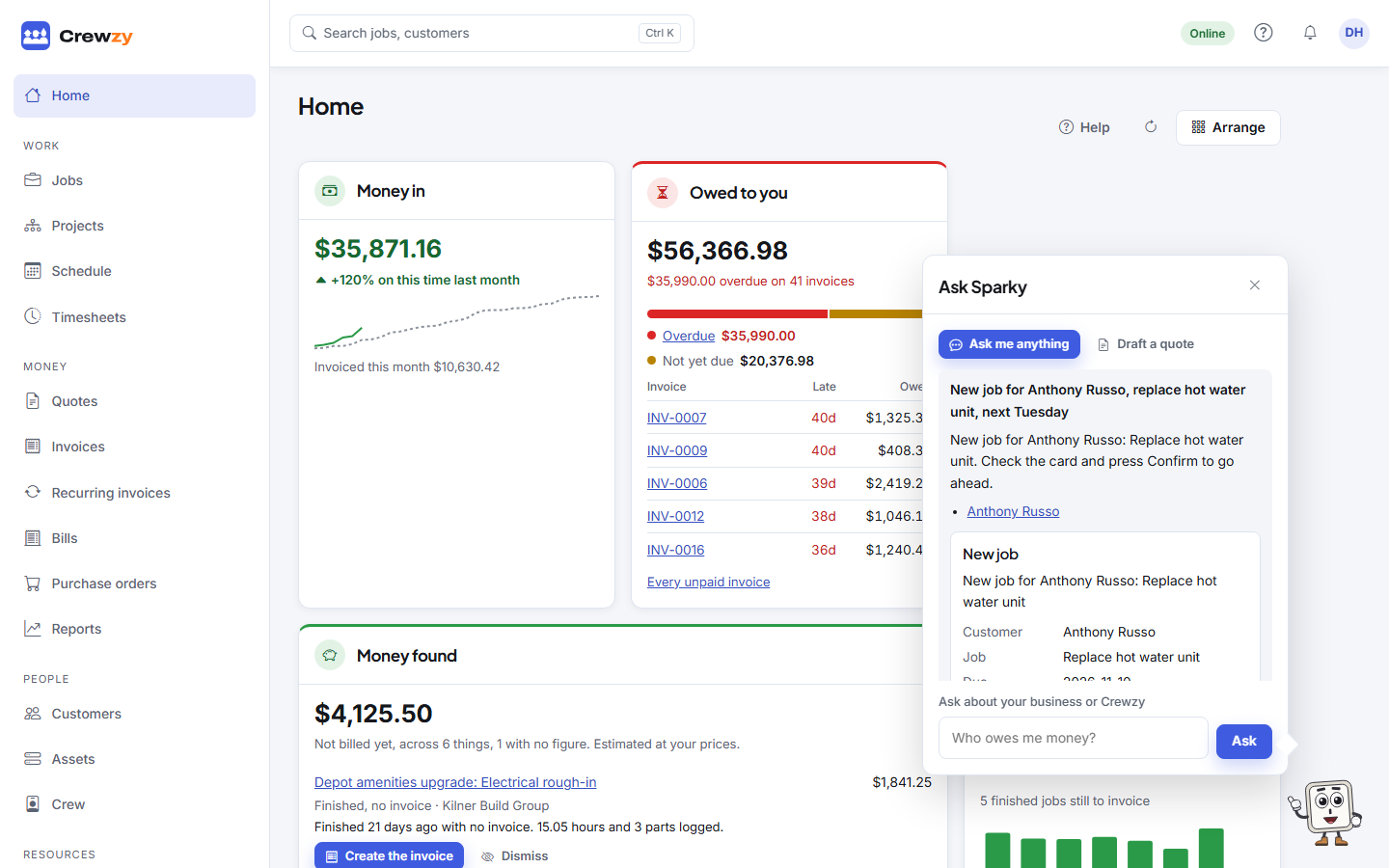
Besides answering questions, the assistant can make changes for you. It never makes them on its own: it shows a card with exactly what it would do, and only you can press Confirm.
Things to ask
Jobs and the crew:
- "New job for Sophie Martin, replace hot water unit, next Tuesday"
- "Add a customer, Harbour Strata, 12 Wharf St Newcastle"
- "Rename the Smith job to Replace hot water system, and make it due Friday"
- "Book Dave on the Smith job Thursday at 8 for 4 hours"
- "Move Dave's booking on the Smith job to Friday at 1pm"
- "Put Mia on the carport job" or "Take Mia off the carport job"
- "Add 2 RCBOs at $85 each to the Smith job"
- "Add 20A breaker to the price list at $28 each"
- "Move the carport job to in progress"
- "Mark the Smith job finished"
- "Add a note to the Smith job: customer wants the old unit left on site"
- "Repeat the lawn mowing job every Tuesday for 4 weeks"
Time:
- "Add time for Dave on the Smith job yesterday, 7:30 to 11:30"
- "Add 7 to 3 on Monday for Dave and Mia on the carport job, half an hour break"
- "Dave's time yesterday on the Smith job should finish at 3, not 5"
Quotes:
- "Quote Fixileaks for a $180 call-out and 2 hours labour at $95"
- "On the bathroom fan quote, make the labour 3 hours"
- "Send the bathroom fan quote to Fixileaks"
- "Fixileaks rang and accepted the deck lights quote"
- "Turn the garden lights quote into a job"
Invoices and payments:
- "Invoice the leaking tap job", or on the job's page, "Invoice this job"
- "Invoice all finished jobs this week"
- "Create an invoice for Harbour Strata for domain renewal $60"
- "Change the due date on the gutter clean invoice to the 30th"
- "Send the gutter clean invoice to Fixileaks"
- "Send Fixileaks a reminder about INV-0042"
- "Send reminders for overdue invoices"
- "Fixileaks paid $200 on INV-0042 by bank transfer"
Several things in one go:
- "New customer Sophie Martin at 4 Bay St Newtown, replace hot water unit, book Dave tomorrow at 7:30" makes the customer, their job and the booking from one card
Keeping everything else up to date:
- "Change Sophie Martin's phone to 0412 345 678", "Add a site for Harbour Strata at 3 Pier St", "Put the gate code 4471 in the access notes for her Newtown site", "Turn off Sophie's portal link"
- "Pause the lawn mowing repeating job", "Skip the mowing visit on the 24th", "End the monthly lighting test", "Make the next visits now"
- "Raise Marrowby's monthly invoice now", "Pause the hosting invoice for Harbour Strata" (raising, changing or resuming only for recurring invoices left as drafts)
- "Change the washers on the leaking tap job to 3", "Add a $180 skip bin cost to the Smith job", "Add the switchboard checklist form to the Smith job", "Add the job sheet draft to the Smith job"
- "Send the Smith job's evidence pack again", or "Don't send it automatically"
- "Pin that note", "Mark the follow-up on the Smith job done"
- "Add the new Hilux, rego CN 41 XB", "Ute 1 is off the road for its rego from tomorrow", "Ute 1 is back", "Book the scissor lift on the carport job Thursday at 7 for 4 hours"
- "Put the after-hours call-out up to $195"
- "We refunded Fixileaks $55 by bank transfer on the roof repair credit, record it"
- "Send everything that didn't reach Xero again", "Bring our customers across from Xero", "Pull the latest jobs from Kilner now"
- "Lock the baseline on the Smith St project", "Add a stage called Commissioning", "Make jobs from the rough-in stage", "Withdraw variation 3", "Close the Smith St project"
- "Record the payment schedule for claim 4: $18,200, received today", "Set retention on the Smith St project to 5%", "Practical completion was yesterday", "Release $4,000 of retention"
- "Add Reece as a supplier", "The Tipworth order has arrived", "Approve the Tipworth bill TSB-777"
- "Set the expiry on Priya's electrical licence to 30 June 2027", "File the insurance certificate against Harbour Strata"
- Owner only: "Invoice job hours at the Electrician rate", "Hide Vehicles and equipment from the menu"
Two of these reach a customer, so each is its own card that says so and whose button says Send: answering a question asked on a quote's link ("Reply to the question on the deck lights quote: yes, the transformer is included"), and texting a customer back in a conversation ("Text Fixileaks back: running 15 minutes late"). The card shows the whole message.
Opened on a job, customer, quote, invoice or project, the assistant knows which one you mean by "this" or "it".
Bigger jobs, a few answers at a time
Some things need more answers than fit in one message: a quote or invoice with lots of lines from your price list, a credit note, a recurring invoice, a project with its stages and budget, a project's contract, a priced variation, a progress claim or a purchase order. Start one and the assistant asks for what it still needs, one or two things at a time, and suggests from your own records: items from your price list, the customer's sites, the project's stages.
- "Build up a quote for Fixileaks", then "a call-out at $180 and 2 hours labour", then "make line 2 three hours"
- "Credit $100 off INV-0042, goodwill for the late start"
- "Set up a monthly invoice for Harbour Strata for website hosting at $30, starting the 1st, as drafts"
- "New project for Northcote Constructions, Smith St townhouses, stages rough-in and fit-off", then the budget for each stage
- "Contract on the Smith St project is $180,000, 5% retention, 10 business days to pay"
- "Variation on the Smith St project: 4 extra GPOs at $150 on rough-in"
- "Progress claim on the Smith St project: rough-in 80%, fit-off 20%"
- "Purchase order from Tipworth for the carport job: two skip bins at $380"
While it is being built, the card stays pinned above where you type, with Still needed showing what is missing. Answer in any order, or change an earlier answer ("make it valid for 30 days", "take off line 3"); the card updates as you go. When nothing is missing, check it and press Confirm. A card that does several things in a row, such as a project with its stages and budget, numbers the steps.
- It makes only drafts: a quote, invoice, variation, claim or order is not sent, and a credit note is not emailed. Sending is offered as its own card once it is made, such as Send it to the supplier now? or Submit and send it now?
- A recurring invoice set up to email each invoice must start tomorrow or later, so nothing goes out the moment you confirm. Charging a customer's saved card is never set up here.
- A draft keeps for two hours after your last answer, and you can carry on after closing the assistant. Cancel throws it away; nothing was made.
- A guided task counts as one AI draft however many answers it takes, which matters on Base, where drafts are counted. After 12 answers the assistant asks you to confirm it or start again.
- If one step of a numbered card doesn't work, the card says which and why. What was made before it stays made, and nothing after it is tried.
The card
Each card shows what will be made or changed, with the old value beside the new one when something changes. Anything worth knowing before you go ahead is shown too, such as a crew member already booked at that time.
- Confirm makes the change, as if you had done it on the screen, and links to the result.
- Cancel changes nothing.
- Do it on the screen instead opens the right page so you can make it by hand.
A card that does several things at once, like invoicing the week's jobs or adding time for several people, lists each one with a tick box. Untick any you don't want before you confirm.
Once something is made, the obvious next step follows as a card of its own under the result: a new quote or invoice offers Send it now?, and a quote marked accepted offers Turn it into a job?. Leave it if you'd rather check the draft first.
Rules it follows
- It can only do what you could do yourself. Crew members can't use it to see or change money.
- Quotes and invoices it makes are drafts. Nothing goes to a customer until you send it, and sending is always a card of its own.
- An amount you give it goes on as you said it, and counts as including or excluding GST the way your business prices. The card says which. Prices from your price list come with the item; it never makes a price up, and a line with no price says so.
- A card that reaches a customer says so at the top, such as This will email invoice INV-0042 to Fixileaks (accounts@fixileaks.com.au) and text them, and its button says Send. Sending a quote or invoice texts the customer too when you have customer texts on, and a booking card says when the customer will be texted the time. A card of reminders lists every customer, and its button says how many, such as Send 3. It sends only to the ones still ticked.
- Recording a payment does not email a receipt unless you tick Email a receipt on the card. It records money you've already received; it never charges anyone.
- Voiding an invoice, refunding a card payment, deleting anything, charging a saved card, and changing someone's role or your plan are done on their own screens. A refund you already paid some other way, such as by bank transfer, can be recorded by a card; it moves no money. For most of them the answer has a Show me button that walks you to the right button, and you press it yourself. See Show me.
- A job with required forms can't be finished through the assistant until they're done.
- A card lasts 15 minutes. If what it's about (a job, quote, invoice, customer, note, bill and so on) changed in the meantime, it asks you to ask again.
- Changes it makes are listed on the job under Done through the assistant, with who confirmed them and when.